
Why We Built Play This Life and How It Works
One place for your tasks, routines, projects and workouts. How Ginger simplifies planning and completed work becomes visible progress.
I want one place for everything I’m trying to do.
The project I care about. The chores that keep home running. The habit I’m trying to build and the workout I want to get back to. They all need time from the same day. I want to be able to look at them together and decide what fits.
I want keeping my life organized to feel simple.
Bringing those things together should make them easier to manage. I want to describe what I need, get help turning it into a useful plan, and spend my attention on doing it. Setting up and maintaining the organization matters just as much as how many things the app can hold.
I want the work I do to feel like it’s taking me somewhere.
When I finish something, I want that effort to have a place in the bigger picture. A project step, a workout and ordinary upkeep can all be part of the life I’m building, even while there’s still plenty left to do.
I’m Aman, the person building Play This Life around those three wishes. At its center is one place for everyday plans. Ginger helps make those plans easier to create and manage, and the progress views keep a record of what you finish.
Why bring everyday life into one app
A personal project, the laundry and a morning routine all ask for time from the same day. A workout belongs to that day too. Planning them together gives you a chance to see what you’re asking of yourself.
That’s what I mean when I call Play This Life an all-in-one app for everyday life. It brings tasks, projects, chores, habits, routines and workouts into one planning system, alongside a record of the progress they create.
There are useful differences within that system. A chore is upkeep. A habit is something you want to practice regularly. A routine is a sequence you do together. A project has a finish line and may need several steps. A goal describes the result you want to reach.
You can keep those differences without spreading the work across separate accounts. The planner helps you organize when things belong, while the specialized views let you use a routine or follow a workout in more detail. Workout entries can include planned sets, repetitions and weights, with actual results recorded as you go.
I want bringing another part of your life into the app to feel natural. The same place should be useful for both the project you’re excited about and the upkeep that makes room for it. Start with a task and add structure when it helps you use it.
How Ginger helps keep it simple
Keeping several parts of life in one place only helps if you can manage them comfortably. There are still decisions to make: what kind of entry something needs, which steps belong in it and when it should happen. That is where I want Ginger to help.
“Sell my prints” is a perfectly reasonable thought to have. It also leaves several decisions between the thought and doing anything about it.
You may need to choose which prints, decide where to sell them or simply work out whether this is an idea to explore now. Asking you to arrive with a finished project plan would put much of the organizing work back on you.
Ginger is the planning assistant inside Play This Life. You can type or speak naturally about a task, a goal or the part that feels unclear. Ginger can ask for missing context, break work into steps, create tasks and help change the plan later.
The conversation leads into the same task system you use to do and track the work. A chore described in chat and a project entered directly can live alongside each other. Close the conversation and the saved work is still there to open, change and complete.
That connection matters to simplicity. You can ask Ginger to help organize the work where you’ll use it, then return to the planner to act on it.
You can also add and edit tasks directly. Chat is there when it helps you think or makes a change easier to describe.
Ginger can misunderstand a request or add more structure than you wanted. Review what it saves, especially dates, repeats and the size of a project. You remain the person deciding what belongs. See more about planning with Ginger.
What a small plan looks like
Here’s a concrete example we checked in a fresh local test account. We brought Ginger a chore, a personal project and a habit:
I have this afternoon free and need clean clothes for tomorrow. Help me save a small plan: one laundry task for today, a project to try selling my prints with just one first step — choose three prints I could offer — and a read-for-ten-minutes habit on weekdays starting tomorrow. Keep the project undated. No other tasks or deadlines.
Ginger saved three entries, with a step inside the project:
- Do laundry: a chore scheduled for that day.
- Sell my prints: an undated project containing Choose three prints to offer.
- Read for ten minutes: a habit repeating Monday to Friday, starting the next day.
We checked the saved entries as well as the reply. The project stayed undated, the reading habit had the requested repeat, and no extra tasks or deadlines were added in that run. This was one local check, so review your own result rather than assuming it will always be identical.
Three kinds of commitments now have one place to return to. The laundry has a reason to happen today. The project has a first step without an invented launch date. Reading has a repeat you deliberately chose.
Ginger helped put that structure in place from one request. The entries stay distinct enough to use, while the planner lets you consider them together. As you complete work, its record can build alongside the work that remains.
The all-in-one planner article follows that example more closely, from scattered intentions to choosing something to begin.
From a saved plan to recorded work
Once the plan is saved, you can use the planner to find the work you intended for a day and open the relevant task or specialized view. You can consider the laundry alongside the project before deciding how much of the afternoon is available for each.
In this example, you could start the laundry and use an available stretch of time to choose the prints. When you finish choosing them, mark that step complete. The larger project can stay open while you decide what comes next.
For reading, return to the habit and record what you did for the relevant day. For a routine, follow and mark its steps. For a workout, record the sets and measurements that actually happened.
If a plan changes, edit it. A chosen date and a real deadline mean different things, and changing one occurrence of repeating work is different from changing its future repeat rule. The app gives those choices their own controls.
The product organizes and records the work. You still make the call, wash the clothes, choose the prints or do the exercise. Completing a planning conversation doesn’t mean those things have happened.
Keep a record across your life
Bringing everyday life together also gives you a chance to look back across it. A week can contain work on a project, routine upkeep and practice at something you care about. I want that effort to remain visible in the same place you use to plan what comes next.
Games make progress visible through experience and abilities. That is the part I want to bring into Play This Life: small actions having somewhere to accumulate, even while a larger objective remains unfinished.
A finished task can leave more than an empty space on a list. It can become a win you can look back at and contribute XP associated with the work. You shouldn’t have to invent a scoring system for every chore before you can begin.
The app’s assessment uses the context of recorded work to determine relevant progress. Assessment can take time; a saved completion may appear before its XP has been assessed. Creating a plan alone doesn’t earn credit for doing it.
For the prints example, choosing the first three prints is a concrete piece of completed work even while selling them remains unfinished. The product is designed to keep that step visible.
The aim is to make it easier to notice what you’ve put into your life. Read about the task and progression loop.
What the progress views mean
Play This Life gives you several ways to look at recorded effort:
- Wins let you review completed work by day, week or month.
- Life XP records assessed effort across your activities.
- Skills connect work to particular abilities, such as writing, cooking or product development, with relevant XP shown alongside them.
- Traits describe broader qualities. The current set is Agency, Clarity, Consistency, Resilience and People Sense.
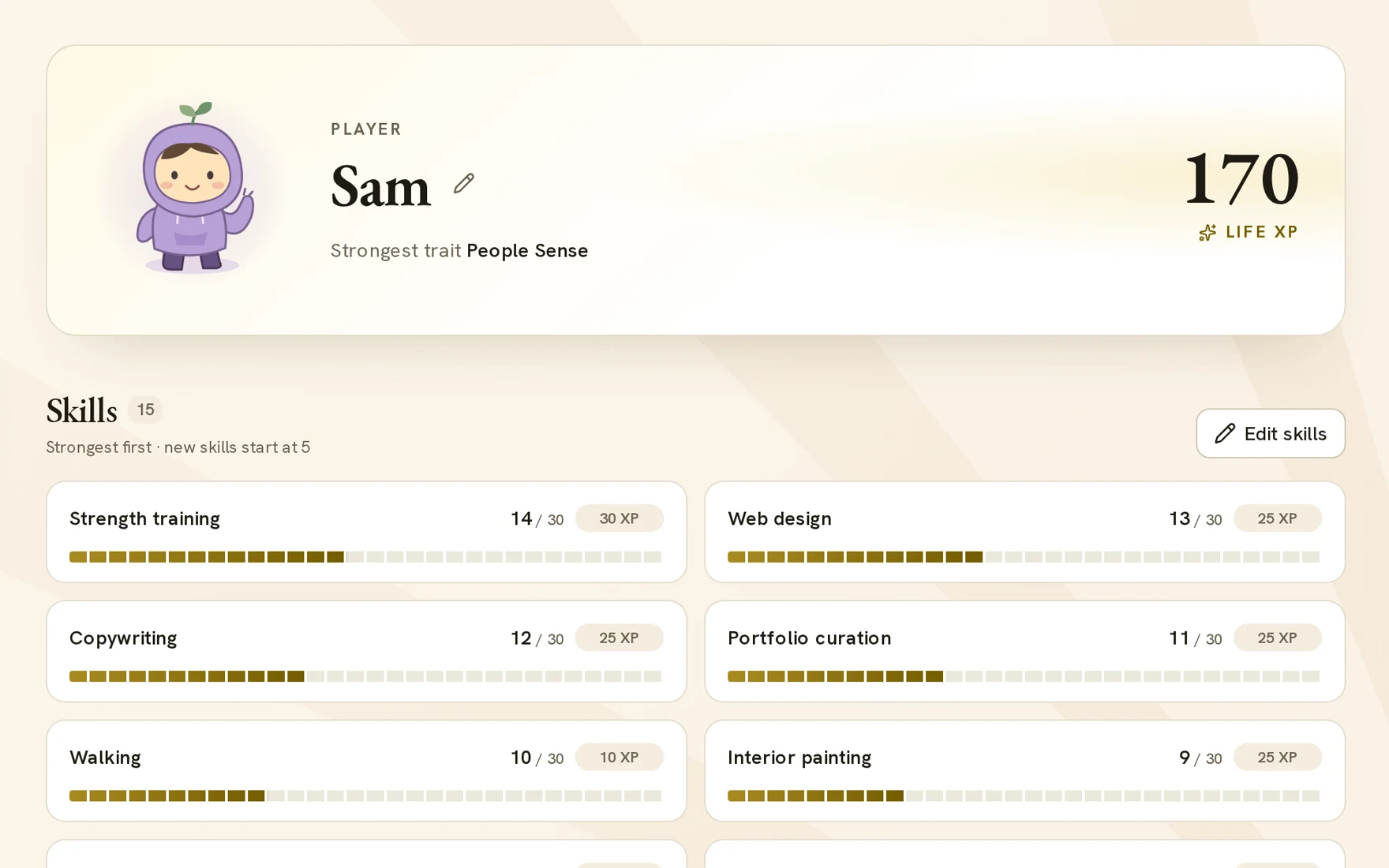
Skill and trait ratings are editable judgments, separate from earned XP. You can review those ratings yourself; accumulating points is not an objective measurement of your ability or personal worth.
I want the record to help answer a practical question at the end of a week: what did I actually do, and where did I put my effort? The answer can include several parts of life. You can see finished work alongside the commitments you’re still carrying, using the same account you planned them in.
You can explore personal progress tracking for more about those views.
Start with the part of life you want help with
Play This Life may fit if you want your everyday responsibilities and personal projects in one place, help turning an unclear intention into a plan, and a visible record of what you finish.
You don’t have to move your entire life into it on the first day. Bring a real task. Ask Ginger about the part that’s unclear. Review the saved work, use it and see whether the experience helps you.
As checked on 18 October 2026, you can try all features for three days without a card. After that, you choose whether to subscribe for $5 USD per month, plus applicable taxes; the trial doesn’t charge automatically. The pricing page has the current terms.
That’s the product I’m building: one place for the things you’re trying to do, help keeping them organized, and a record of the effort you put in. Start with one part of life, then bring in the next when it helps. Give Ginger something you already care about.